
Website Redesign SEO: Will a website redesign affect Google rankings?
Many business websites need a redesign after several years of use, but website redesign SEO must be planned carefully before any major changes are made. A website may look outdated, load too slowly, perform poorly on mobile devices, have a confusing content structure, or no longer match the company’s current brand image and services. However, if the redesign is handled incorrectly, it may affect existing Google rankings, organic traffic, and customer inquiries.
The answer is: yes, a website redesign can affect SEO, but not every redesign causes ranking loss. The real difference depends on whether the redesign is properly planned, whether important SEO assets are protected during the process, and whether technical checks are completed after launch.
If handled correctly, a website redesign can do more than protect your existing SEO. It can also improve website speed, mobile experience, content quality, user experience, and long-term Google rankings.
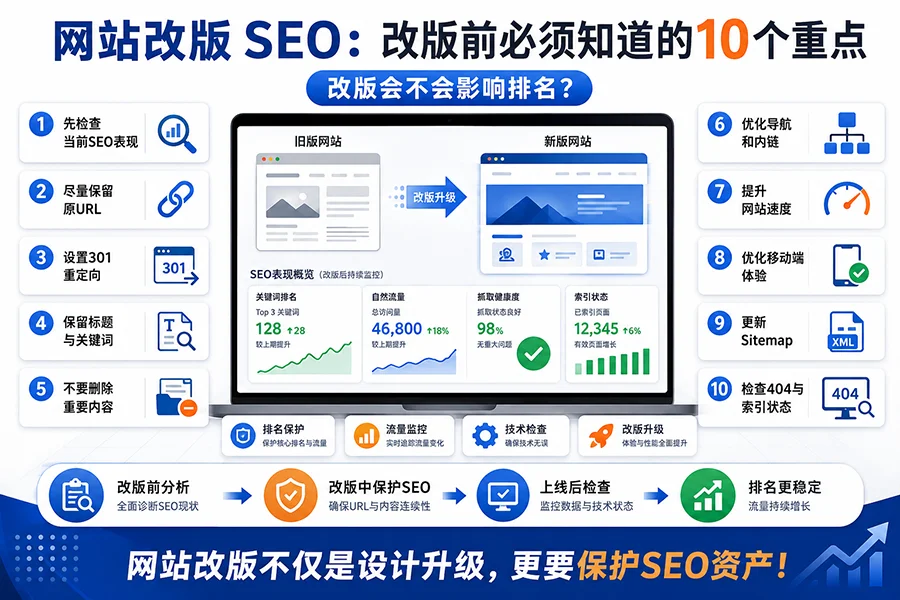
Below are 10 key points every business should understand before redesigning a website.
1. Review Your Current SEO Performance Before the Redesign
Before redesigning your website, do not rush to delete old pages or change the website structure. The first step is to understand how the current website is performing in search engines.
You can use tools such as Google Search Console, Google Analytics, Rank Math, Ahrefs, SEMrush, or other SEO tools to check which pages are receiving organic traffic, which keywords are ranking, and which pages are generating inquiries, calls, or conversions.
This data is extremely important. A website redesign should not be treated as starting from zero. It should be an upgrade based on the existing SEO foundation. If you do not know which pages are valuable, you may accidentally remove important pages and cause Google rankings to drop.
2. Avoid Changing URLs That Already Have Rankings
During a website redesign, many businesses reorganize page URLs. For example, service pages, blog posts, product pages, or location pages may be moved to new addresses. Although a URL may look like just a page address, it is very important for website redesign SEO.
If a page has already been indexed by Google and has keyword rankings, changing the URL without setting up a proper 301 redirect can create serious problems. When Google or users visit the old URL, they may see a 404 error page. This can cause ranking signals to be lost and negatively affect website redesign SEO.
Before redesigning the website, make a list of all important URLs. Pages with rankings, traffic, backlinks, or lead-generation value should keep their original URLs whenever possible. If a URL must be changed, a 301 redirect should be set up from the old URL to the most relevant new URL.
3. Set Up 301 Redirects Correctly
A 301 redirect is one of the most important website redesign SEO techniques in a website redesign. It tells search engines that an old page has permanently moved to a new page, and that the SEO value should be transferred to the new address.
For example, if the old page is:
/website-design-vancouver/
and the new page is:
/services/website-design-vancouver/
then a 301 redirect should be created so that both users and Google are automatically sent from the old address to the new page.
It is important not to redirect every old page to the homepage. Each old page should be redirected to the most relevant new page. If many old pages are all redirected to the homepage, Google may consider those redirects irrelevant, which can weaken the website redesign SEO value.
4. Keep Important Page Titles and Keyword Structure
Some websites look much better after a redesign but lose rankings because important SEO content was removed or weakened. A common problem is that page titles, headings, keywords, and body content are changed too much.
For example, an old page may have used clear keyword phrases such as “Vancouver website design,” “Surrey security camera,” or “Langley daycare.” After the redesign, the page title may become something vague like “Our Services” or “Professional Solutions.”
Although the new wording may look cleaner, Google may no longer clearly understand the topic of the page.
During a website redesign, important SEO titles, meta descriptions, H1 headings, H2 headings, keyword phrases, and core service descriptions should be preserved or carefully improved. The design can be updated, but the page topic should not become unclear.
5. Do Not Remove Too Much Important Text Content
Some redesign projects focus too much on visual appearance. The old text content is reduced heavily, leaving only large images, animations, slogans, and a few buttons. While this may look modern, it is often not good for SEO.
Google relies on written content to understand the topic of a page, the services offered, the service areas covered, and the strengths of the business. If a service page does not contain enough useful text, Google may have difficulty deciding which keywords the page should rank for.
A business website redesign should balance design and website redesign SEO. The homepage can be clean and simple, but service pages, location pages, product pages, and blog articles still need clear, complete, and valuable content.
6. Review Website Navigation and Internal Links
Website navigation affects both user experience and Google crawling. Before a redesign, businesses should check whether important pages can be accessed through the main menu, footer, sidebar, or internal links.
If important pages are removed from the navigation and no other pages link to them, Google may treat those pages as less important. Users may also have difficulty finding the information they need.
A strong website structure should clearly include key sections such as Home, About Us, Services, Portfolio, Blog, and Contact. website redesign SEO articles and service pages should also be connected through internal links to create a logical content network.
7. Improve Website Speed and Mobile Experience
One of the main goals of a website redesign is usually to improve user experience. However, if the new website uses too many animations, large images, video backgrounds, heavy plugins, or complex page builder effects, it may become slower than the old website.
Website speed is important for both website redesign SEO and user experience. This is especially true for mobile users. If a mobile page loads slowly, visitors may leave quickly. For local service businesses, many customers search and contact businesses directly from their phones, so mobile performance is critical.
During the redesign, images should be compressed, WebP format should be considered, caching should be configured, code should be optimized, unnecessary plugins should be reduced, and above-the-fold loading speed should be improved. The mobile menu, buttons, forms, and phone links should also work properly.
8. Update the Sitemap and Submit It to Google Search Console
After the redesigned website goes live, the sitemap should be regenerated and checked. A sitemap helps Google understand which pages are important and should be crawled and indexed.
If your website uses WordPress, plugins such as Rank Math SEO or Yoast SEO can generate a sitemap. After the redesign, confirm that the sitemap URL works correctly and resubmit it in Google Search Console.
You should also check whether important pages are accidentally blocked by robots.txt, whether any pages are set to noindex by mistake, whether there are many 404 errors, and whether all important pages can be crawled by Google.
9. Check 404 Errors and Indexing Status After Launch
Launching the redesigned website does not mean the website redesign SEO work is finished. The first few weeks after launch are very important. You should monitor Google Search Console for crawl errors, 404 pages, indexing issues, page experience problems, and keyword changes.
If old pages return 404 errors, 301 redirects should be added as soon as possible. If important pages are not indexed, check the page content, internal links, sitemap, and noindex settings. If rankings fluctuate slightly after the redesign, review the data carefully to determine whether it is a normal adjustment period or a technical problem.
Small ranking fluctuations after a redesign can be normal. However, if many pages become inaccessible, important content is removed, redirects are incorrect, or technical settings are wrong, the website may suffer long-term website redesign SEO loss.
10. A Website Redesign Should Be a New Starting Point for website redesign SEO
Many businesses think of a website redesign as simply getting a new visual design. In reality, an effective redesign should be a complete website upgrade.
It should include visual design, website structure optimization, content improvement, speed optimization, mobile optimization, technical SEO checks, and conversion rate improvement.
A good redesigned website should help customers understand your services more easily, help Google crawl your content more effectively, make pages load faster, and create a clearer path for inquiries and conversions.
A website redesign should not be handled only as a design project. website redesign SEO specialists, content editors, and technical developers should also be involved. This helps avoid the common problem of having a website that looks better but ranks worse.
How to Reduce Website Redesign SEO Risk During a Website Redesign
If your business is preparing for a website redesign, it is important to create an SEO redesign checklist before the project begins. This checklist should include:
- Backing up the old website
- Exporting important page URLs
- Recording current keyword rankings
- Reviewing organic search traffic
- Preserving important titles and content
- Setting up 301 redirects
- Optimizing mobile experience
- Testing website speed
- Updating the sitemap(opens in new tab)
- Checking 404 errors and indexing status after launch
These steps may seem technical, but they are essential for protecting Google rankings. This is especially important for websites that already have some SEO foundation. Existing content and URL structures should never be deleted or replaced carelessly.
Conclusion: Website Redesign Can Affect website redesign SEO, But the Risk Can Be Controlled
A website redesign can affect website redesign SEO, especially when URLs are changed, important content is removed, page titles are replaced, redirects are missing, website speed becomes slower, or mobile experience gets worse.
However, if SEO data is reviewed before the redesign, important pages and keywords are protected during the process, and technical checks are completed after launch, a website redesign does not have to be a risk. It can become an opportunity to improve long-term website redesign SEO performance.
For small and medium-sized businesses, a professional website should not only look good. It should also be indexed by Google, found by customers, trusted by visitors, and designed to generate inquiries and business growth.
PPIT specializes in website design, WordPress website redesign, website maintenance, and website redesign SEO services for small and medium-sized businesses in Canada. We help businesses evaluate website redesign SEO risks before redesigning a website, plan website structure, set up 301 redirects, optimize page content, and improve technical SEO details. The goal is to upgrade your website’s visual image while protecting existing Google rankings and improving long-term SEO performance.

