
Why Is My WordPress Website So Slow? 8 Technical Issues That Affect Website SEO
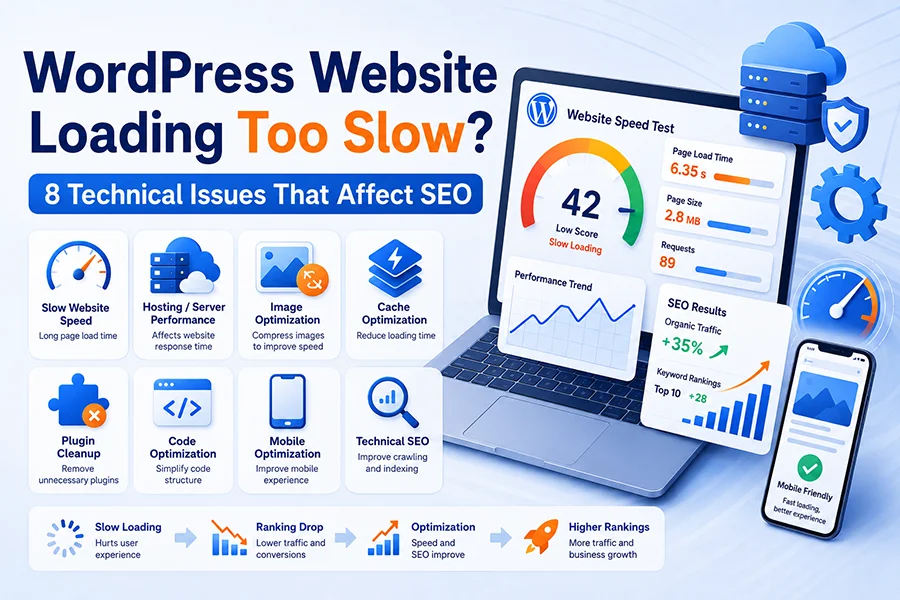
WordPress is one of the most popular website platforms for business websites, service websites, blogs, portfolios, and WooCommerce online stores. It is flexible, easy to manage, and supported by thousands of themes and plugins. However, many business owners face the same problem after their website has been running for a while: the website becomes slower and slower, and Google rankings may start to drop. If your WordPress website is loading slowly, it is important to identify the real causes instead of only installing another plugin. Below are 8 common technical issues that can affect WordPress speed and website SEO.
A slow WordPress website is not only a technical problem. It can directly affect user experience, conversion rates, and website SEO performance. When visitors click on your website and the page takes too long to load, many of them will leave immediately and visit a competitor’s website instead. Google also uses page experience, loading speed, mobile usability, and other technical signals to evaluate whether a website deserves better search visibility.
1. Poor Hosting or Server Performance
The foundation of website speed is hosting. If your website is hosted on a low-cost shared server, your website may share CPU, memory, and database resources with many other websites. When other websites on the same server use too many resources, your own website speed can be affected.
For a business website targeting customers in Canada or North America, it is important to choose reliable hosting with good server performance and a suitable data center location. If your website has many images, products, forms, or WooCommerce features, you may need a VPS, cloud server, or managed WordPress hosting solution.
A stable hosting environment is one of the first steps in building strong website SEO.
2. Large Images That Are Not Optimized
One of the most common reasons for a slow WordPress website is oversized images. A homepage banner image may be 3MB, 5MB, or even larger, while the actual display size on the website does not require such a large file. If a page contains several large images, the loading speed will slow down significantly.
Before uploading images to WordPress, you should resize and compress them. Using modern image formats such as WebP can also reduce file size while maintaining good visual quality. Homepage banners, product images, blog images, and service page graphics should all be optimized.
Image optimization improves page speed, helps users load pages faster, and supports better website SEO performance.
3. Too Many Plugins or Poor-Quality Plugins
Plugins are one of the greatest advantages of WordPress, but they can also become a major performance problem. Many websites install too many plugins for contact forms, SEO, security, caching, page builders, popups, analytics, sliders, and other functions. Each plugin may add extra CSS, JavaScript, database queries, and server requests.
Some plugins are poorly coded, outdated, or no longer maintained. These plugins can slow down your website, create conflicts, or even introduce security risks.
It is a good practice to review your plugins regularly. Remove plugins that are no longer needed, avoid duplicate functions, and keep all essential plugins updated. A cleaner plugin structure can improve website speed and support better website SEO results.
4. Caching Is Not Properly Configured
Caching is one of the most important parts of WordPress speed optimization. Without caching, each page visit may require the server to query the database, run PHP scripts, and generate the page again. When traffic increases, the server may become slower.
With proper page caching, browser caching, and object caching, your website can load much faster. Popular caching solutions include LiteSpeed Cache, WP Rocket, and W3 Total Cache. If your server uses LiteSpeed, LiteSpeed Cache can often deliver excellent results.
Proper caching can improve loading speed, reduce server workload, and help improve Core Web Vitals, which are important for website SEO.
5. The WordPress Database Has Not Been Cleaned
Over time, WordPress databases can collect unnecessary data such as post revisions, spam comments, expired transients, old plugin data, and temporary records. Although visitors cannot see this data, it can affect database performance and slow down your website.
Websites that publish content frequently, manage many products, or have tested many plugins should clean and optimize the database regularly. A cleaner database helps WordPress run more efficiently, improves backend speed, and supports long-term website SEO stability.
6. Page Builders Can Generate Heavy Code
Many WordPress websites use page builders such as Elementor or WPBakery. These tools are useful for creating modern layouts quickly, but they can also generate heavy front-end code if the page design is too complex.
Too many animations, sliders, background videos, dynamic effects, and nested sections can increase page weight and slow down loading speed. From an SEO perspective, a website should not only look good; it should also be lightweight, fast, and easy for users and search engines to understand.
For important pages such as the homepage, service pages, and landing pages, the structure should be clean, the content should be clear, and the loading speed should be fast. Heavy page builder layouts can hurt mobile performance, user engagement, and website SEO.
7. Mobile Speed Has Not Been Optimized
Most local service searches now happen on mobile devices. Google also places strong emphasis on mobile usability and page experience. A website may look acceptable on desktop, but if it loads slowly on mobile, has small text, hard-to-click buttons, poor layout, or broken images, it can negatively affect search performance.
Mobile optimization includes responsive design, properly sized images, simplified scripts, clean navigation, fast first-screen loading, and mobile-friendly contact options. For service-based businesses, phone buttons, contact forms, maps, and service descriptions must work smoothly on mobile devices.
A fast and user-friendly mobile experience can improve both conversion rates and website SEO performance.
8. Lack of Technical SEO Maintenance
Many business owners focus on keywords and blog content but overlook technical SEO. Common technical problems include 404 errors, duplicate titles, missing or broken sitemap files, incorrect robots.txt settings, expired SSL certificates, slow pages, poor internal linking, and pages that are not indexed properly by Google.
These problems may not be obvious on the front end, but they can affect how Google crawls, indexes, and understands your website.
It is important to check Google Search Console regularly for indexing issues, crawl errors, page experience problems, and keyword performance. Website SEO is not a one-time setup. It requires continuous monitoring, technical maintenance, and content improvement.
How to Improve WordPress Speed and Website SEO
If your WordPress website is slow, the solution should not be limited to installing a caching plugin. A complete optimization process should review hosting, theme structure, plugins, images, database performance, front-end code, mobile experience, and technical SEO settings.
A fast, well-structured, and content-rich website is easier for Google to crawl and more pleasant for users to visit. For business websites, the purpose of website SEO is not only to get more traffic, but also to help potential customers find your company, understand your services, and contact you with confidence.
PPIT provides WordPress website design, website maintenance, and website SEO services for businesses in Canada. We help local companies improve website speed, strengthen Google rankings, and increase customer inquiries. If your website is loading slowly or your Google ranking has recently dropped, a full technical SEO review can help identify the real problems and create a practical improvement plan.
