
Website Design
Bilingual Website Design: 7 Tips for Vancouver Businesses That Serve Two Languages

Table of Contents Why Vancouver Businesses Need Two Languages Online Tip 1: Pick One URL Structure and Stick With It Tip 2: Implement Hreflang Tags Correctly Tip 3: Make the Language Switcher Obvious and Reliable Tip 4: Keep Content Parity Across Both Languages Tip 5: Don’t Ship Raw Machine Translation Tip 6: Keep Branding and…
Read MoreSEO Services Canada: 7 Deliverables to Expect Before You Sign Anything

Table of Contents Why Most SEO Disappointment Is a Contract Problem Deliverable 1: A Real Audit Before Any Work Starts Deliverable 2: On-Page Optimization You Can Actually See Deliverable 3: Technical Fixes, Not Just Advice Deliverable 4: Content Built Around What Customers Search Deliverable 5: Local SEO for Canadian Markets Deliverable 6: Ethical Link Building,…
Read MoreWebsite Design Vancouver: 9 Signs Your Business Needs a Website Redesign

Most business owners think about website design Vancouver services only twice: when they first launch a site, and when something breaks. In between, the site quietly ages — and an aging website doesn’t just look tired, it actively costs you customers. 1. Your site isn’t mobile-friendly More than half of all web traffic now comes…
Read MoreWebsite Design Canada: 7 Questions to Ask Before Hiring an Agency

Choosing a partner for website design Canada businesses rely on is one of the highest-leverage decisions a small or mid-sized business can make. Your website is your storefront, your salesperson, and your first impression — often all three at once. The website design Canada market is crowded, ranging from solo freelancers to full-service agencies, which…
Read MoreWordPress Website Design Services for Small Businesses in Canada
WordPress is one of the most widely used content management systems in the world. It is easy to manage, flexible, scalable, and SEO-friendly, making it an excellent choice for small and medium-sized businesses that want to build a professional company website. Whether you need a business website, service website, educational institution website, local business website,…
Read MoreWhy Small Businesses Need a Company Website Instead of Relying Only on Social Media
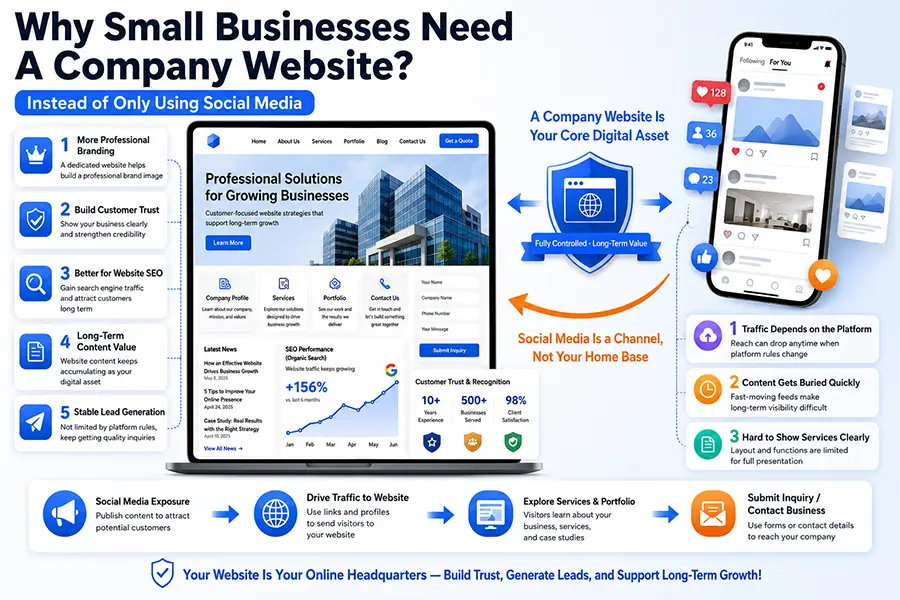
In today’s business environment, many small and medium-sized businesses use platforms such as Facebook, Instagram, WeChat, LinkedIn, TikTok, or other social media channels to promote their products and services. Social media is convenient, fast, interactive, and useful for showing customers daily updates, promotions, and business activities. Because of this, some business owners may wonder: if…
Read MoreBusiness Website Design: Practical SEO Guide for 2026

Business Website Design is an important SEO topic for canadatony.com. This draft is designed for manual review before publishing, so you can add local examples, service details, pricing notes, and internal links. Business Website Design: Key Points to Consider Why this keyword matters People searching for Business Website Design usually want a specific answer, a…
Read MoreHow Much Does Website Design Cost in Canada? $1000?

How Much Does Website Design Cost in Canada? For many small business owners in Canada, one of the first questions before starting a new website project is simple: how much does website design cost in Canada? The honest answer is: it depends. A basic business website may cost only a few thousand dollars, while a…
Read MoreHow to edit a page in WordPress with Beaver Builder?

How to edit a page in WordPress with Beaver Builder? Here’s the practical workflow to edit a WordPress page using Beaver Builder (works for both Beaver Builder Plugin and Beaver Builder Theme). 1) Open the page for editing if you edit a page in WordPress with Beaver Builder: In WordPress admin, go to Pages →…
Read MoreWordPress Tutorials – Posts – How to Create and Edit Posts
How to publish a new post: Log in to your WordPress admin panel: Enter yourdomain.com/wp-admin in your browser’s address bar (replace yourdomain.com with your website domain). Access the post editing page: In the left-hand menu, click “Posts” > “Add Post”. Add a title and content: In the editor, enter the post title (Add title), and…
Read More
